Elements of Data Science
SDS 322E
H. Sherry Zhang
Department of Statistics and Data Sciences
University of Texas at Austin
R history and ecosystem
1976: S was initiated as an internal statistical analysis environment—originally implemented as Fortran libraries. S is a language that was developed by John Chambers and others at Bell Labs.
1991: Created in New Zealand by Ross Ihaka and Robert Gentleman. Their experience developing R is documented in a 1996 JCGS paper.
1997: The R Core Group is formed. The core group controls the source code for R. See more about the Foundation: https://www.r-project.org/foundation/
Why R?
R code:
How would the FORTRAN 90 code look like?
FORTRAN 90 code for the same task
9 lines of code in R vs. 70 lines of code in FORTRAN 90
program mtcars_summary
    implicit none
    integer, parameter :: dp = selected_real_kind(15, 307)
    integer, parameter :: nmax = 100
    real(dp) :: mpg(nmax), disp(nmax), kpl(nmax)
    integer :: cyl(nmax), vs(nmax)
    integer :: i, n, j, ngrp, idx
    integer :: cyl_group(nmax)
    real(dp) :: disp_sum(nmax), kpl_sum(nmax)
    integer :: count(nmax)
    real(dp) :: disp_mean(nmax), kpl_mean(nmax)
    integer :: temp_i
    real(dp) :: temp_r
    ! open and read data
    open(unit=10, file='mtcars.csv', status='old', action='read')
    n = 0
    do
        read(10, *, end=100) mpg(n+1), cyl(n+1), disp(n+1), &
                              temp_r, temp_r, temp_r, temp_r, vs(n+1), &
                              temp_i, temp_i, temp_i
        n = n + 1
    end do
100 close(10)
    ! compute kpl
    do i = 1, n
        kpl(i) = mpg(i) * 0.425144_dp
    end do
    ! filter vs == 0
    ngrp = 0
    do i = 1, n
        if (vs(i) == 0) then
            ! check if cyl group already exists
            idx = 0
            do j = 1, ngrp
                if (cyl_group(j) == cyl(i)) idx = j
            end do
            if (idx == 0) then
                ngrp = ngrp + 1
                cyl_group(ngrp) = cyl(i)
                disp_sum(ngrp) = disp(i)
                kpl_sum(ngrp) = kpl(i)
                count(ngrp) = 1
            else
                disp_sum(idx) = disp_sum(idx) + disp(i)
                kpl_sum(idx)  = kpl_sum(idx) + kpl(i)
                count(idx)    = count(idx) + 1
            end if
        end if
    end do
    ! compute means
    do j = 1, ngrp
        disp_mean(j) = disp_sum(j) / count(j)
        kpl_mean(j)  = kpl_sum(j) / count(j)
    end do
    ! sort by disp_mean
    do i = 1, ngrp-1
        do j = i+1, ngrp
            if (disp_mean(j) < disp_mean(i)) then
                temp_r = disp_mean(i); disp_mean(i) = disp_mean(j); disp_mean(j) = temp_r
                temp_r = kpl_mean(i);  kpl_mean(i)  = kpl_mean(j);  kpl_mean(j)  = temp_r
                temp_i = cyl_group(i); cyl_group(i) = cyl_group(j); cyl_group(j) = temp_i
            end if
        end do
    end do
    ! print result
    print '(A4,2X,A10,2X,A10)', 'cyl', 'disp_mean', 'kpl_mean'
    do j = 1, ngrp
        print '(I4,2X,F10.3,2X,F10.3)', cyl_group(j), disp_mean(j), kpl_mean(j)
    end do
end program mtcars_summary
R ecosystem
Base packages: base, methods, datasets, utils, grDevices, graphics, stats
Recommended packages: MASS, lattice, Matrix, nlme, survival, boot, cluster, codetools, foreign, KernSmooth, rpart, spatial, splines, tcltk
Contributed packages: 20,000 + packages contributed by users available on CRAN or Bioconductor (
tidyverselives here!) and more on GitHub (likeemo).
R basics
Gapminder Data
https://www.youtube.com/watch?v=jbkSRLYSojo&ab_channel=BBC
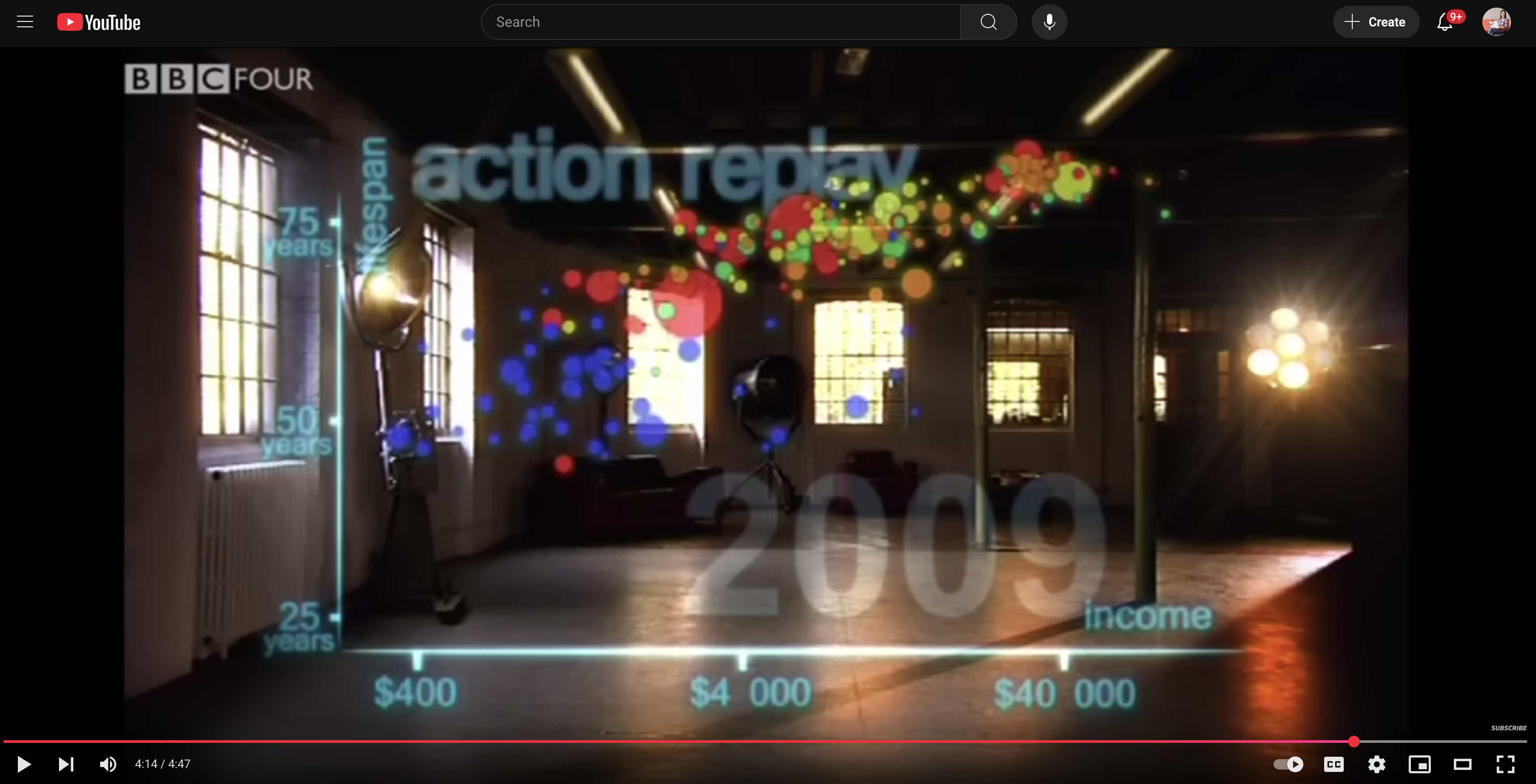
Gapminder Data
# A tibble: 1,704 × 6
   country     continent  year lifeExp      pop gdpPercap
   <fct>       <fct>     <int>   <dbl>    <int>     <dbl>
 1 Afghanistan Asia       1952    28.8  8425333      779.
 2 Afghanistan Asia       1957    30.3  9240934      821.
 3 Afghanistan Asia       1962    32.0 10267083      853.
 4 Afghanistan Asia       1967    34.0 11537966      836.
 5 Afghanistan Asia       1972    36.1 13079460      740.
 6 Afghanistan Asia       1977    38.4 14880372      786.
 7 Afghanistan Asia       1982    39.9 12881816      978.
 8 Afghanistan Asia       1987    40.8 13867957      852.
 9 Afghanistan Asia       1992    41.7 16317921      649.
10 Afghanistan Asia       1997    41.8 22227415      635.
# ℹ 1,694 more rows
Read documentation
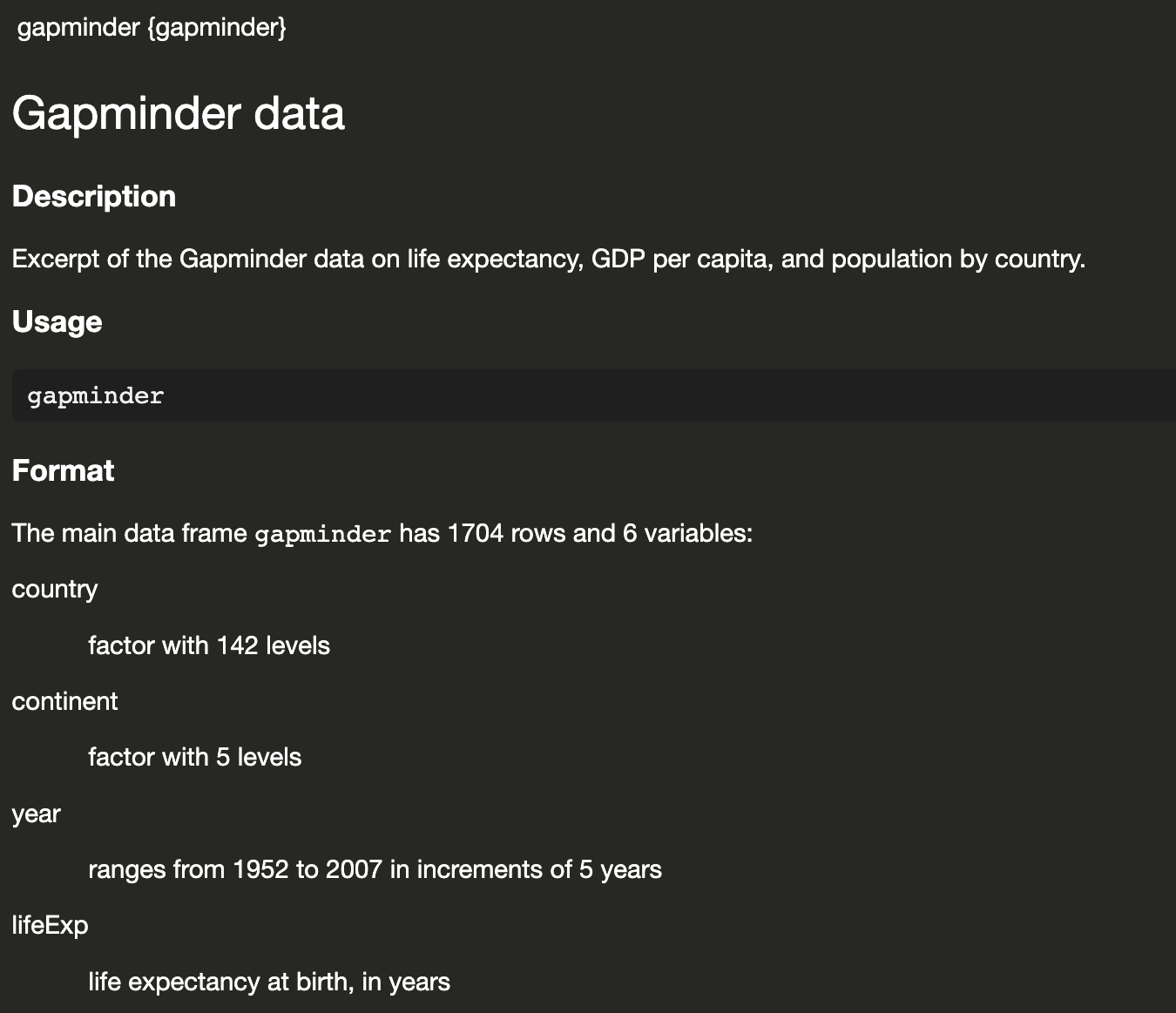
How many rows and how many columns?
The main data frame gapminder has 1704 rows and 6 variables:
Did you notice?
When we print the data, the header already tells you the number of rows and columns
#A tibble: 1,704 × 6
# A tibble: 1,704 × 6
   country     continent  year lifeExp      pop gdpPercap
   <fct>       <fct>     <int>   <dbl>    <int>     <dbl>
 1 Afghanistan Asia       1952    28.8  8425333      779.
 2 Afghanistan Asia       1957    30.3  9240934      821.
 3 Afghanistan Asia       1962    32.0 10267083      853.
 4 Afghanistan Asia       1967    34.0 11537966      836.
 5 Afghanistan Asia       1972    36.1 13079460      740.
 6 Afghanistan Asia       1977    38.4 14880372      786.
 7 Afghanistan Asia       1982    39.9 12881816      978.
 8 Afghanistan Asia       1987    40.8 13867957      852.
 9 Afghanistan Asia       1992    41.7 16317921      649.
10 Afghanistan Asia       1997    41.8 22227415      635.
# ℹ 1,694 more rows
How many continent?
Continent is a factor with 5 levels
How many countries?
Country is a factor with 142 levels
  [1] Afghanistan              Albania                  Algeria
  [4] Angola                   Argentina                Australia
  [7] Austria                  Bahrain                  Bangladesh
 [10] Belgium                  Benin                    Bolivia
 [13] Bosnia and Herzegovina   Botswana                 Brazil
 [16] Bulgaria                 Burkina Faso             Burundi
 [19] Cambodia                 Cameroon                 Canada
 [22] Central African Republic Chad                     Chile
 [25] China                    Colombia                 Comoros
 [28] Congo, Dem. Rep.         Congo, Rep.              Costa Rica
 [31] Cote d'Ivoire            Croatia                  Cuba
 [34] Czech Republic           Denmark                  Djibouti
 [37] Dominican Republic       Ecuador                  Egypt
 [40] El Salvador              Equatorial Guinea        Eritrea
 [43] Ethiopia                 Finland                  France
 [46] Gabon                    Gambia                   Germany
 [49] Ghana                    Greece                   Guatemala
 [52] Guinea                   Guinea-Bissau            Haiti
 [55] Honduras                 Hong Kong, China         Hungary
 [58] Iceland                  India                    Indonesia
 [61] Iran                     Iraq                     Ireland
 [64] Israel                   Italy                    Jamaica
 [67] Japan                    Jordan                   Kenya
 [70] Korea, Dem. Rep.         Korea, Rep.              Kuwait
 [73] Lebanon                  Lesotho                  Liberia
 [76] Libya                    Madagascar               Malawi
 [79] Malaysia                 Mali                     Mauritania
 [82] Mauritius                Mexico                   Mongolia
 [85] Montenegro               Morocco                  Mozambique
 [88] Myanmar                  Namibia                  Nepal
 [91] Netherlands              New Zealand              Nicaragua
 [94] Niger                    Nigeria                  Norway
 [97] Oman                     Pakistan                 Panama
[100] Paraguay                 Peru                     Philippines
[103] Poland                   Portugal                 Puerto Rico
[106] Reunion                  Romania                  Rwanda
[109] Sao Tome and Principe    Saudi Arabia             Senegal
[112] Serbia                   Sierra Leone             Singapore
[115] Slovak Republic          Slovenia                 Somalia
[118] South Africa             Spain                    Sri Lanka
[121] Sudan                    Swaziland                Sweden
[124] Switzerland              Syria                    Taiwan
[127] Tanzania                 Thailand                 Togo
[130] Trinidad and Tobago      Tunisia                  Turkey
[133] Uganda                   United Kingdom           United States
[136] Uruguay                  Venezuela                Vietnam
[139] West Bank and Gaza       Yemen, Rep.              Zambia
[142] Zimbabwe
142 Levels: Afghanistan Albania Algeria Angola Argentina Australia ... Zimbabwe
How many countries?
Country is a factor with 142 levels
What’ the range of year reported?
Year ranges from 1952 to 2007 in increments of 5 years
What’s the min, mean, median, max of lifeExp?
Flight data
# A tibble: 336,776 × 19
   year month   day dep_time sched_dep_time dep_delay arr_time sched_arr_time
  <int> <int> <int>    <int>          <int>     <dbl>    <int>          <int>
1  2013     1     1      517            515         2      830            819
2  2013     1     1      533            529         4      850            830
3  2013     1     1      542            540         2      923            850
4  2013     1     1      544            545        -1     1004           1022
5  2013     1     1      554            600        -6      812            837
# ℹ 336,771 more rows
# ℹ 11 more variables: arr_delay <dbl>, carrier <chr>, flight <int>,
#   tailnum <chr>, origin <chr>, dest <chr>, air_time <dbl>, distance <dbl>,
#   hour <dbl>, minute <dbl>, time_hour <dttm>
We can’t see all the variables - we need a better way to see it
Flight data: dplyr::glimpse()
Rows: 336,776
Columns: 19
$ year           <int> 2013, 2013, 2013, 2013, 2013, 2013,…
$ month          <int> 1, 1, 1, 1, 1, 1, 1, 1, 1, 1, 1, 1,…
$ day            <int> 1, 1, 1, 1, 1, 1, 1, 1, 1, 1, 1, 1,…
$ dep_time       <int> 517, 533, 542, 544, 554, 554, 555, …
$ sched_dep_time <int> 515, 529, 540, 545, 600, 558, 600, …
$ dep_delay      <dbl> 2, 4, 2, -1, -6, -4, -5, -3, -3, -2…
$ arr_time       <int> 830, 850, 923, 1004, 812, 740, 913,…
$ sched_arr_time <int> 819, 830, 850, 1022, 837, 728, 854,…
$ arr_delay      <dbl> 11, 20, 33, -18, -25, 12, 19, -14, …
$ carrier        <chr> "UA", "UA", "AA", "B6", "DL", "UA",…
$ flight         <int> 1545, 1714, 1141, 725, 461, 1696, 5…
$ tailnum        <chr> "N14228", "N24211", "N619AA", "N804…
$ origin         <chr> "EWR", "LGA", "JFK", "JFK", "LGA", …
$ dest           <chr> "IAH", "IAH", "MIA", "BQN", "ATL", …
$ air_time       <dbl> 227, 227, 160, 183, 116, 150, 158, …
$ distance       <dbl> 1400, 1416, 1089, 1576, 762, 719, 1…
$ hour           <dbl> 5, 5, 5, 5, 6, 5, 6, 6, 6, 6, 6, 6,…
$ minute         <dbl> 15, 29, 40, 45, 0, 58, 0, 0, 0, 0, …
$ time_hour      <dttm> 2013-01-01 05:00:00, 2013-01-01 05…
Access the documentation with ?
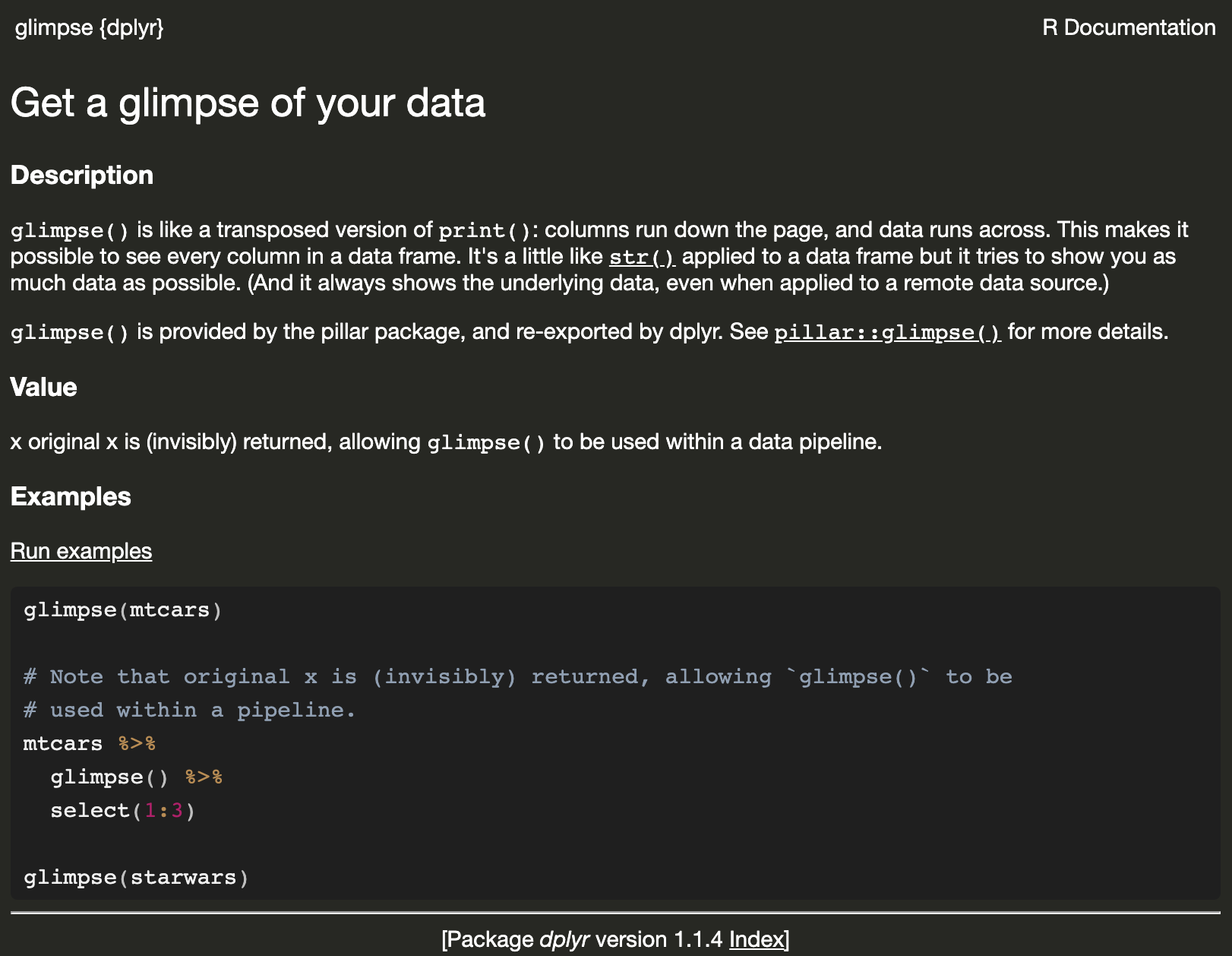
Look at the first few rows
# A tibble: 3 × 19
   year month   day dep_time sched_dep_time dep_delay
  <int> <int> <int>    <int>          <int>     <dbl>
1  2013     1     1      517            515         2
2  2013     1     1      533            529         4
3  2013     1     1      542            540         2
# ℹ 13 more variables: arr_time <int>,
#   sched_arr_time <int>, arr_delay <dbl>, carrier <chr>,
#   flight <int>, tailnum <chr>, origin <chr>, dest <chr>,
#   air_time <dbl>, distance <dbl>, hour <dbl>,
#   minute <dbl>, time_hour <dttm>
The last few rows?
# A tibble: 3 × 19
   year month   day dep_time sched_dep_time dep_delay
  <int> <int> <int>    <int>          <int>     <dbl>
1  2013     9    30       NA           1210        NA
2  2013     9    30       NA           1159        NA
3  2013     9    30       NA            840        NA
# ℹ 13 more variables: arr_time <int>,
#   sched_arr_time <int>, arr_delay <dbl>, carrier <chr>,
#   flight <int>, tailnum <chr>, origin <chr>, dest <chr>,
#   air_time <dbl>, distance <dbl>, hour <dbl>,
#   minute <dbl>, time_hour <dttm>
Check the documentation to see the default n value for head() and tail().

You can also View() the data
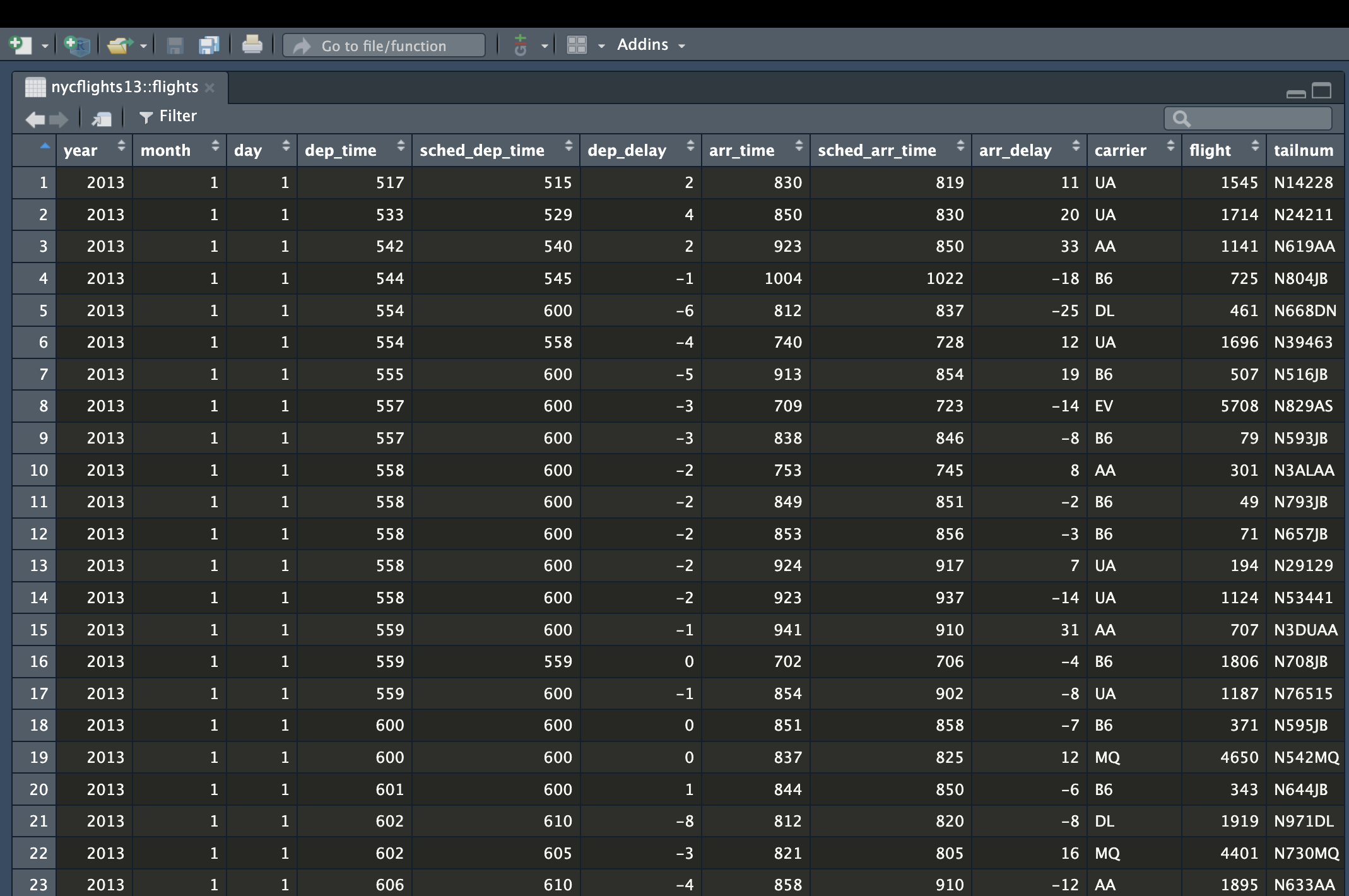
What’s the average of arrival delay (arr_delay)
why?
Lesson learnt
Practice installing and loading packages with
install.packages("pkg")andlibrary(pkg).Read documentation of a function or a dataset with
?FUNor?DATASET.Check the number of rows, columns, column names with
nrow(),ncol(),colnames().Compute summary statistics with
unique(),length(),range(),diff(),min(),mean(),median(),max(),summary(). Use the argumentna.rm = TRUEto accommodate missing values.View data with
View(),dplyr::glimpse()and View the first or last few rows withhead()andtail().
Your time (1/2)
Practice what we’ve just learn via
Tricks and tips to make you slightly more comfortable in R and RStudio
Coding is never memorization!
Ask anyone you know who works with data or software to write down their code on paper in one go…
Example: search and install from GitHub
I want to add emoji in the lecture slides and I know there is the emo package. The syntax is emo::ji("emoji_name"). Type in the console:
Error in loadNamespace(x) : there is no package called ‘emo’
Okay… I don’t have the package in my lastest R installation, let’s install it…
Warning in install.packages : package ‘emo’ is not available for this version of R A version of this package for your version of R might be available elsewhere, see the ideas at https://cran.r-project.org/doc/manuals/r-patched/R-admin.html#Installing-packages
Example: search and install from GitHub
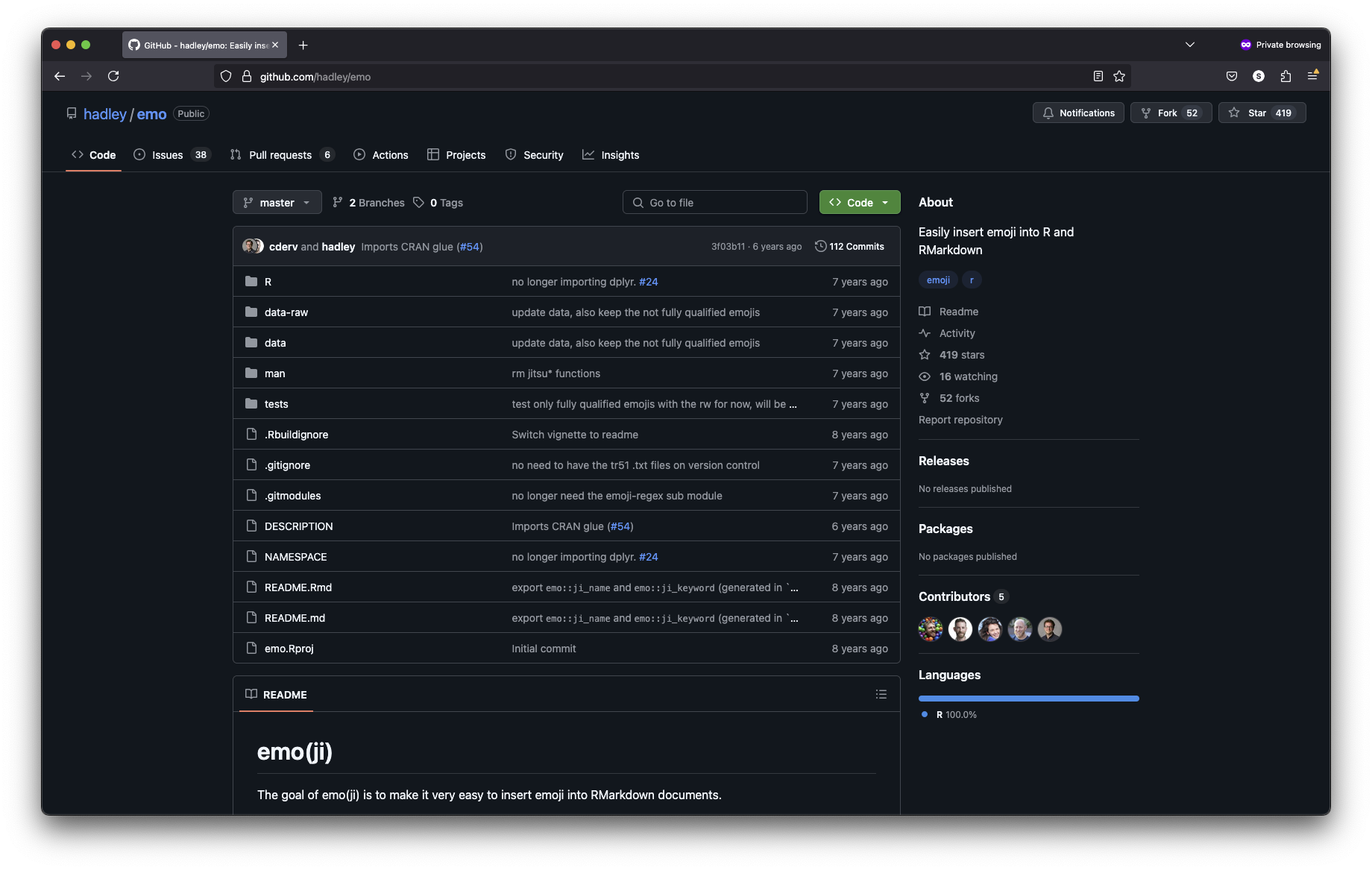
Aha - it’s GitHub package (I know it is written by Hadley Wickham), let me find it:
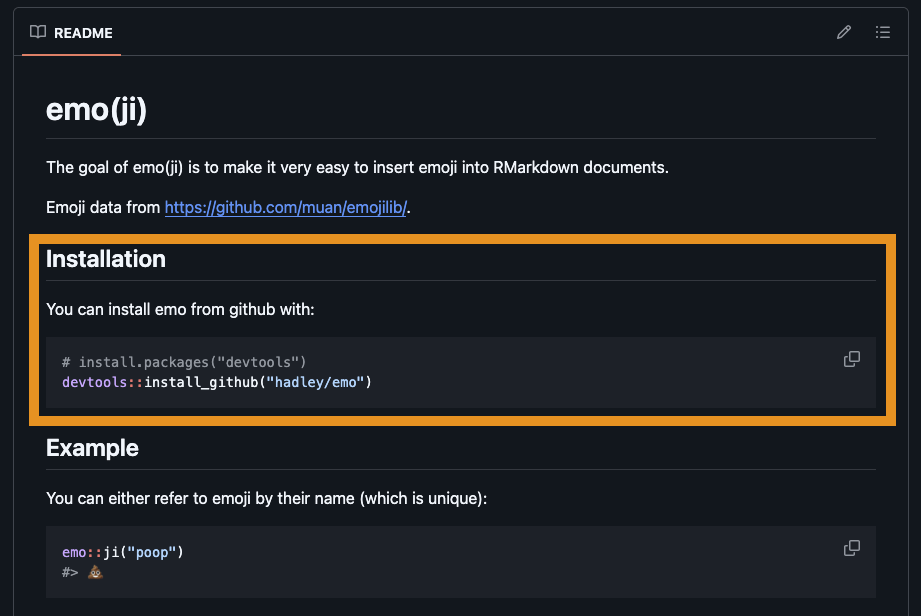
and find this:
Example: search and install from GitHub
Example: search and install from GitHub
Scroll down to find this line, and run it in your console:
Example: search and install from GitHub
If I want to use functions from a pacakge multiple times, it is easier to load the package first: library(pkg)
Your time (2/2)
Install and load the
tidyversepackage from CRAN- Install:
install.packages("tidyverse") - Load:
library(tidyverse)
- Install:
(advance) Install and load the
emopackage from GitHub- Install the CRAN package
devtoolsfirst:install.packages("devtools") - Install the
emopackage from GitHub:devtools::install_github("hadley/emo") - Load the library:
library(emo) - Print your favorite emoji, e.g.
emo::ji("heart")
- Install the CRAN package