Elements of Data Science
SDS 322E
H. Sherry Zhang
Department of Statistics and Data Sciences
The University of Texas at Austin
Fall 2026
Department of Statistics and Data Sciences
The University of Texas at Austin
Fall 2026
From exploring to modeling
So far, we have described the data we have: wrangling and visualizing it.
For the rest of the semester, we will build models from the data to
- find structure: Are there groups of similar observations? Can many variables be summarized by a few?
- make predictions: Given a new observation, what is its value of
y?
These are the two families of machine learning: unsupervised and supervised learning.
Supervised vs. unsupervised
Supervised: there is an outcome y
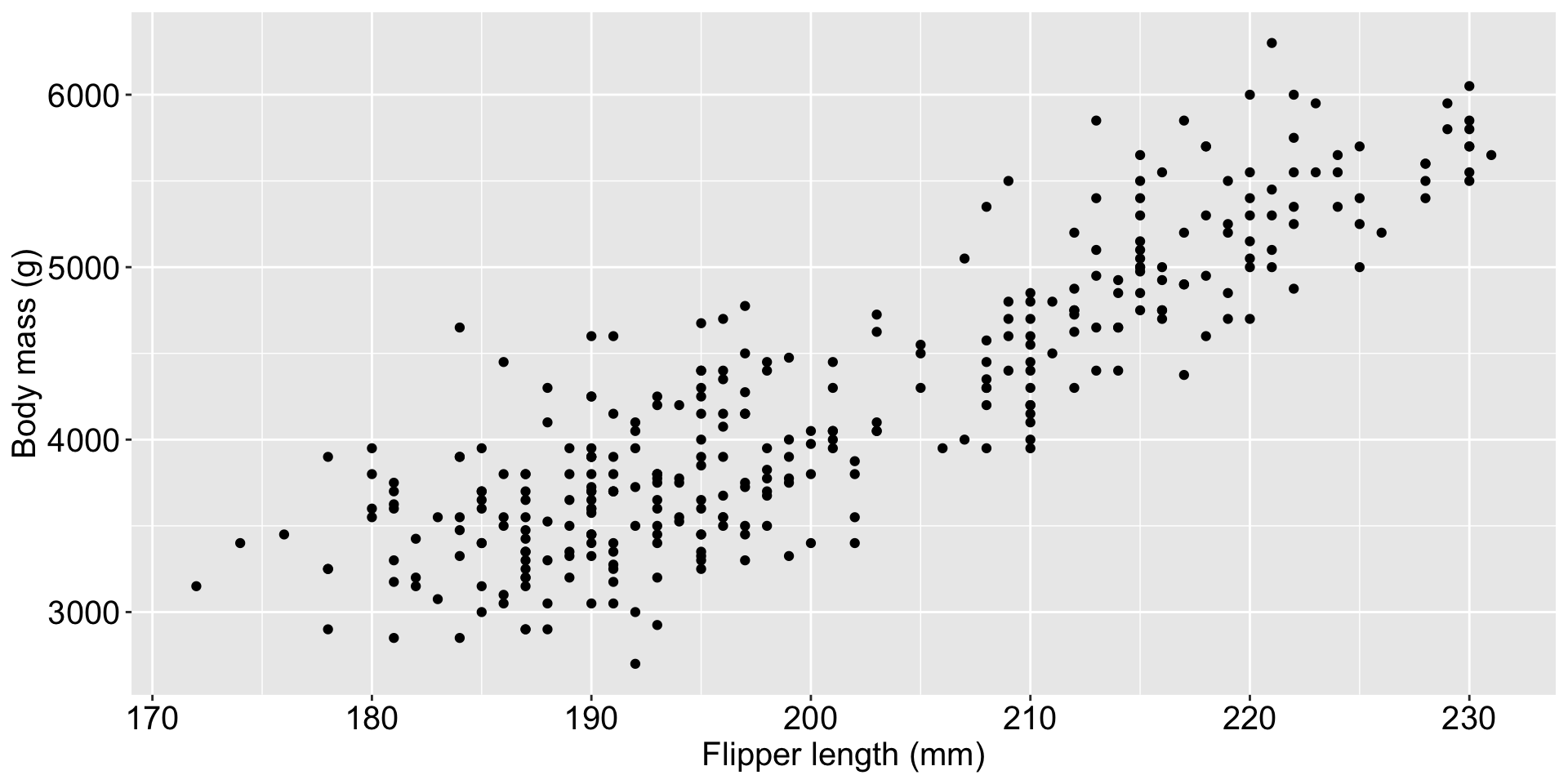
Predict a penguin’s body mass from its flipper length (regression), or predict its sex from its body measurements (classification).
Unsupervised: no outcome, only x variables
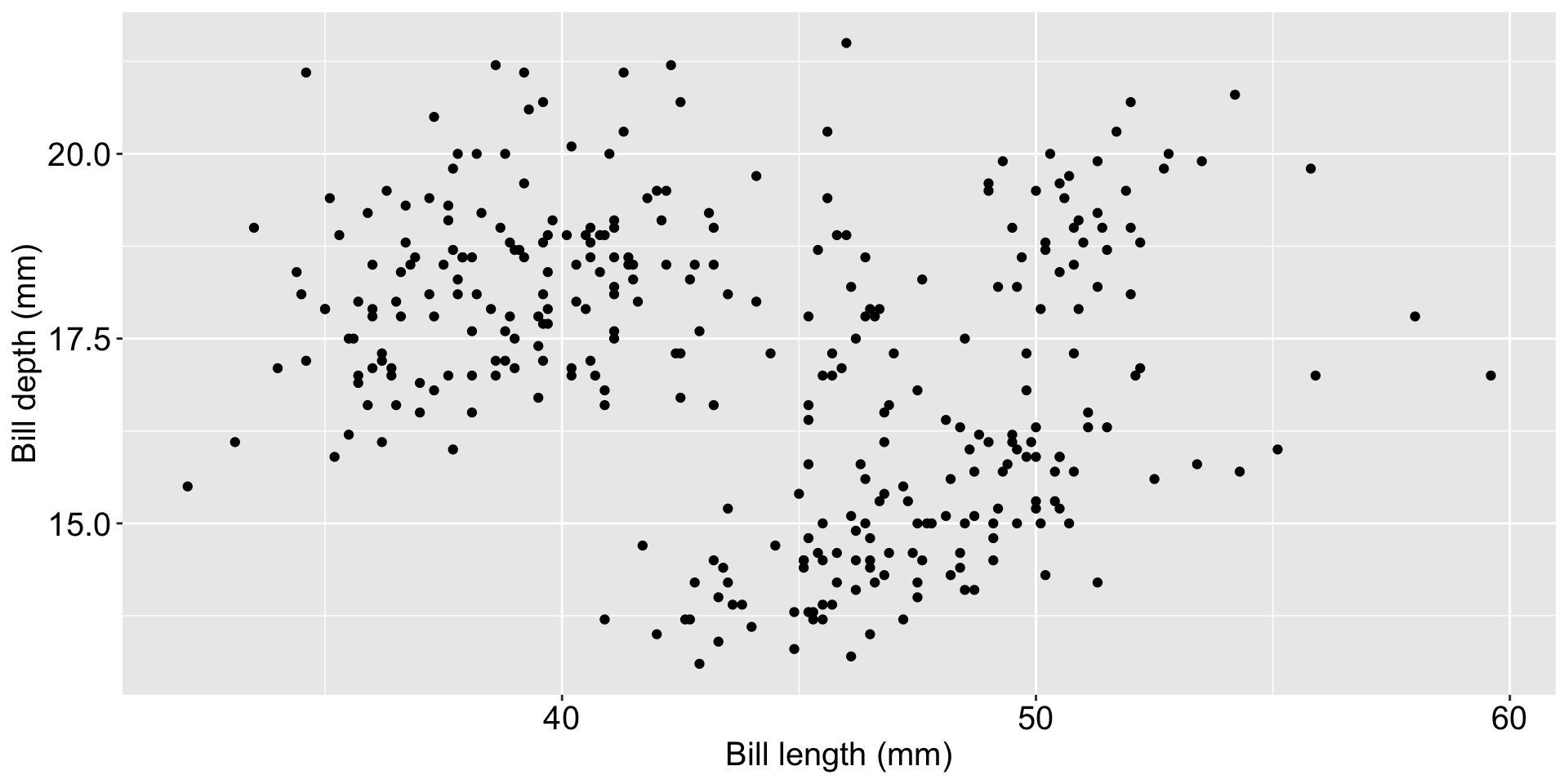
Are there groups of penguins with similar bills (clustering)? Can four body measurements be summarized by two (dimension reduction)?
You need to be able to identify which type of problem you are solving before you can choose a method.
The wider ML toolbox
Finding structure (unsupervised)
- Dimension reduction: Principal Component Analysis (PCA), multidimensional scaling (MDS), t-SNE, UMAP
- Clustering: K-means, hierarchical clustering, DBSCAN, Gaussian mixture models
- Anomaly detection: isolation forests, one-class SVM
- Association rules: market basket analysis (“customers who bought X also bought Y”)
Making predictions (supervised)
- Linear models: Linear Regression, Logistic Regression, ridge and lasso regression
- Fixed-, random- and mixed-effects models
- Flexible curves: splines, generalized additive models
- Neighbors and probability: K-Nearest Neighbors, naive Bayes, discriminant analysis
- Trees and ensembles: Decision Trees, Random Forests, gradient boosting (e.g. XGBoost)
- Support vector machines
- Neural networks and deep learning
Methods in bold are the ones we learn in this class. The rest follow the same big picture, and are a natural next step after this class.
Models for special kinds of data
Data with a special structure have their own families of models:
| Data | Example question | Models |
|---|---|---|
| Time series | What will Austin’s electricity demand be next week? | ARIMA, exponential smoothing (ETS), state space models, Prophet, recurrent neural networks (LSTM) |
| Spatial data | What is the air pollution between two monitors? | Kriging (Gaussian processes), spatial autoregressive (SAR/CAR) models, geographically weighted regression, point process models |
| Networks | Which airports hold the flight network together? | Exponential random graph models (ERGM), stochastic block models, latent space models, graph neural networks |
| Time to an event | How long until a customer cancels a subscription? | Kaplan–Meier curves, Cox proportional hazards model, accelerated failure time models, random survival forests |
| Grouped data | How do test scores vary within and across schools? | Fixed-effects models, random-intercept and random-slope (mixed-effects) models, generalized linear mixed models (GLMMs), generalized estimating equations (GEE) |
| Cause and effect | Does a job training program raise income? | Randomized experiments (A/B tests), propensity score matching and weighting, difference-in-differences, instrumental variables, regression discontinuity |
The methods in this class
Unsupervised learning
No outcome
- find structure in the
xvariables
Methods:
- Principal Component Analysis (PCA) (dimension reduction)
- K-means and hierarchical clustering (clustering)
Supervised learning
Predict an outcome y:
- regression (numeric
y) - classification (categorical
y)
Methods:
- Linear Regression (regression)
- Logistic Regression (classification)
- K-Nearest Neighbors (both)
- Decision Trees (both)
- Random Forests (both)
What model should we use?
- Parametric models assume a specific functional form: e.g.
- Linear Regression: \(y = \beta_0 + \beta_1 x_1\)
- Logistic Regression: \(\text{logit}(P(y=1)) = \beta_0 + \beta_1 x_1\)
- Non-parametric models make fewer assumptions about the functional form, e.g.
- K-Nearest Neighbors
- Decision Trees
- Random Forests
Which model is the best? We need metrics to compare models
- Regression: RMSE, R squared
- Classification: confusion matrix, accuracy, precision, ROC curve and AUC
The big picture: an ML project
- Start with a question and the data
- Clean and explore the data (first half of the class)
- Split the data at random: 1) a training set for building the model, 2)a test set for comparing across models
for each candidate ML algorithm
- Preprocess if necessary, e.g. scale the variables
- Set up the grid for hyperparameters tuning, if any (e.g. \(k\) in KNN)
- Use cross-validation on the training set to pick the best hyperparameter value
- Refit the model on the training set with the best hyperparameter value
- Use the model to predict the outcome for the test set
- Compute the evaluation metric (RMSE, accuracy, etc.) to choose the best model
Every line of code is a decision
In the second half, the code follows a template: a full tidymodels workflow can be long, but most lines look the same from one problem to the next. The focus is on understanding what each algorithm or step does, and how to apply it to a specific problem: which algorithm suits the question, which settings to try, and which data each step should use.
penguins_split <- initial_split(penguins_clean, prop = 0.75)
penguins_train <- training(penguins_split)
penguins_test  <- testing(penguins_split)

# cross-validation: which data should go in?
folds <- vfold_cv(penguins_train, v = 10)   # (a)
folds <- vfold_cv(penguins_test,  v = 10)   # (b)
folds <- vfold_cv(penguins_clean, v = 10) # (c)- All three lines run without an error or a warning. They differ in one argument.
- Only (a) is right: cross-validation chooses settings using the training set only, so the test set stays unseen until the end. (b) and (c) let the test data leak into our choices.
- Choosing (a) is not a coding skill: it takes understanding what cross-validation is for and why we split the data.
This is not a math class
- The algorithms in this course were chosen partly because they are less math intensive: each can be explained with a picture and a few sentences.
- We introduce the math behind each algorithm only as much as needed to understand what it does and how to use it.
- For those who are interested, the appendix at the end of each lecture’s slides has the relevant math and more detailed interpretation.
- You will not be asked to code an algorithm by hand.
- Instead, we use existing, mature R packages that implement these algorithms, and focus on applying them to real problems: choosing the right tool, using it correctly, and interpreting the results.
Packages: the classic tools
| Algorithm | Fit the model | Look at the results |
|---|---|---|
| PCA | stats::prcomp() |
library("factoextra"), fviz_eig(), fviz_pca_var(), fviz_pca_biplot() |
| K-means clustering | stats::kmeans() |
library("factoextra"), fviz_nbclust(), fviz_cluster() |
| Linear regression | stats::lm() |
summary(), predict(), resid() |
| Logistic regression | stats::glm(family = "binomial") |
predict(type = "response"), plotROC::geom_roc() |
Each of these fits one model with one function call, which is all we need for unsupervised methods and for linear and logistic regression.
More flexible algorithms (k-nearest neighbors, decision trees, random forests) have hyperparameters, so we need to find the best version of the model: train-test split, cross-validation, and hyperparameter tuning.
Packages: tidymodels
tidymodels is a collection of packages, one for each step of the big picture. It also covers the algorithms above: linear_reg() and logistic_reg() fit the same models as lm() and glm().
| Package | Step in the big picture | Functions |
|---|---|---|
rsample |
Train-test split, cross-validation folds | initial_split(), training(), testing(), vfold_cv() |
recipes |
Preprocessing | recipe(), step_normalize(), step_naomit(), prep(), bake() |
parsnip |
Choosing the algorithm | linear_reg(), logistic_reg(), nearest_neighbor(), decision_tree(), rand_forest(), set_engine(), set_mode() |
workflows |
Combining preprocessing and algorithm | workflow(), add_recipe(), add_model() |
tune |
Cross-validation and tuning | fit_resamples(), tune(), tune_grid(), collect_metrics(), select_best(), finalize_workflow(), last_fit() |
dials |
Grids of tuning values | grid_regular(), neighbors() |
yardstick |
Metrics | metrics(), rmse(), accuracy(), conf_mat(), roc_curve(), roc_auc() |
broom |
Turning model output into tibbles | tidy(), glance(), augment() |
What’s next
Unsupervised learning
| Oct 19 | 9a | Clustering: k-means and hierarchical clustering |
| Oct 21 | 9b | Principal component analysis |
Supervised learning: the classic models
| Oct 23 | 9c | Linear regression |
| Oct 26 | 10a | Logistic regression |
| Oct 28 | 10b | ML in practice I: from a question to an ML problem |
Supervised learning: flexible models and tuning
| Oct 30 | 10c | Introduction to tidymodels |
| Nov 2 | 11a | K-nearest neighbors and cross validation |
| Nov 4 | 11b | ML in practice II: building a KNN model, start to finish |
| Nov 6 | 11c | Regression and classification trees |
| Nov 9 | 12a | Random forests |
| Nov 11 | 12b | ML in practice III: building a random forest, start to finish |
| Nov 16 | 13a | Case study III: classifying U.S. flights |
| Nov 18 | 13b | Case study III: classifying U.S. flights (cont.) |