Elements of Data Science
SDS 322E

H. Sherry Zhang
Department of Statistics and Data Sciences
The University of Texas at Austin

Fall 2026

Learning objectives

  • Understand the K-means and hierarchical clustering algorithms on a high level
  • Prepare data for clustering: remove missing values (na.omit()), scale variables (scale()), and select numeric variables
  • Perform K-means clustering in R:
    • choose K with domain knowledge, the elbow method, or the silhouette method (factoextra::fviz_nbclust())
    • fit with kmeans(centers = , nstart = ) and use set.seed() for reproducible results
    • add cluster labels back to the data and interpret clusters with summaries and plots
  • (Appendix) Perform hierarchical clustering in R: 1) compute distances with dist() and fit with hclust(), 2) compare linkage methods (single, complete, average, Ward’s) using dendrograms, 3) cut the tree into K clusters with cutree() and compare the results with K-means

Cluster analysis in life

Imagine you’re a supermarket manager deciding how to arrange these sports equipment onto two shelves:

  • dumbbell
  • barbell
  • hiking boots
  • golf club
  • tennis racket
  • resistance band

One solution:

  • Shelf 1, gym equipment: dumbbell, barbell, resistance band
  • Shelf 2, outdoor sports equipment: hiking boots, golf club, tennis racket

There’s no single “correct” answer: it depends on how we define similar.

Cluster analysis

Clustering groups observations so that items in the same cluster are similar to each other and different from items in other clusters.

  • It is unsupervised: there is no outcome variable or label to predict, only structure to find.

Two common approaches:

  • K-means clustering: we choose the number of clusters, K, in advance (K = 2 shelves above).

  • Hierarchical clustering: we don’t fix K in advance. The algorithm builds a tree of nested clusters (a dendrogram), and we choose K afterwards by cutting the tree.

Example: Penguins data

as_tibble(penguins)
# A tibble: 344 × 8
   species island    bill_len bill_dep flipper_len body_mass sex     year
   <fct>   <fct>        <dbl>    <dbl>       <int>     <int> <fct>  <int>
 1 Adelie  Torgersen     39.1     18.7         181      3750 male    2007
 2 Adelie  Torgersen     39.5     17.4         186      3800 female  2007
 3 Adelie  Torgersen     40.3     18           195      3250 female  2007
 4 Adelie  Torgersen     NA       NA            NA        NA <NA>    2007
 5 Adelie  Torgersen     36.7     19.3         193      3450 female  2007
 6 Adelie  Torgersen     39.3     20.6         190      3650 male    2007
 7 Adelie  Torgersen     38.9     17.8         181      3625 female  2007
 8 Adelie  Torgersen     39.2     19.6         195      4675 male    2007
 9 Adelie  Torgersen     34.1     18.1         193      3475 <NA>    2007
10 Adelie  Torgersen     42       20.2         190      4250 <NA>    2007
# ℹ 334 more rows

Make sure you’re using the base R penguins dataset, not the one from the palmerpenguins package.

K-means with the penguins data

Question: using only body measurements, can we find groups of penguins that look like the different species?

This is an unsupervised problem: we set species aside, cluster on the measurements, and then check whether the clusters line up with species.

The kind of structure we might find (not necessarily true):

  • A penguin with a small bill depth is likely to be a Gentoo.
  • A penguin with a short bill AND a deep bill is likely to be an Adelie.

To run K-means in R:

set.seed([SOME_NUMBER])
kmeans([DATA], centers = [NUMBER_OF_CLUSTERS])

K-means pre-processing

Missing values are not allowed in K-means: remove them with na.omit().

penguins_clean <- as_tibble(penguins) |> na.omit()
penguins_clean
# A tibble: 333 × 8
   species island    bill_len bill_dep flipper_len body_mass sex     year
   <fct>   <fct>        <dbl>    <dbl>       <int>     <int> <fct>  <int>
 1 Adelie  Torgersen     39.1     18.7         181      3750 male    2007
 2 Adelie  Torgersen     39.5     17.4         186      3800 female  2007
 3 Adelie  Torgersen     40.3     18           195      3250 female  2007
 4 Adelie  Torgersen     36.7     19.3         193      3450 female  2007
 5 Adelie  Torgersen     39.3     20.6         190      3650 male    2007
 6 Adelie  Torgersen     38.9     17.8         181      3625 female  2007
 7 Adelie  Torgersen     39.2     19.6         195      4675 male    2007
 8 Adelie  Torgersen     41.1     17.6         182      3200 female  2007
 9 Adelie  Torgersen     38.6     21.2         191      3800 male    2007
10 Adelie  Torgersen     34.6     21.1         198      4400 male    2007
# ℹ 323 more rows

K-means pre-processing

Variables can be in different scales, e.g. body_mass are in thousands while bill_length are in tens: scale all the variables to the same unit.

The base R scale() function does 2 things:

  1. centers the variables to have mean 0 - this is optional for K-means

  2. scales the variables to have standard deviation 1 - this is necessary for K-means

kmeans_df <- penguins_clean[,3:6] |> scale() 
kmeans_df |> head() # this is a matrix
       bill_len  bill_dep flipper_len  body_mass
[1,] -0.8946955 0.7795590  -1.4246077 -0.5676206
[2,] -0.8215515 0.1194043  -1.0678666 -0.5055254
[3,] -0.6752636 0.4240910  -0.4257325 -1.1885721
[4,] -1.3335592 1.0842457  -0.5684290 -0.9401915
[5,] -0.8581235 1.7444004  -0.7824736 -0.6918109
[6,] -0.9312674 0.3225288  -1.4246077 -0.7228585

What’s the issue with variables being in different scales?

K-means pre-processing: variable selection

Some variables in the dataset are categorical (island, sex). Should we include them?

No, K-means does not allow categorical variables. It computes cluster means and Euclidean distances, which only make sense for numbers: what is the average of “Biscoe” and “Dream”? If you try, R gives an error:

kmeans(penguins_clean[, c("bill_len", "island")], centers = 2)
#> Error in do_one(nmeth) : NA/NaN/Inf in foreign function call (arg 1)

Recoding categories as numbers (Biscoe = 1, Dream = 2, Torgersen = 3) runs, but is misleading: it treats Torgersen as “twice as far” from Biscoe as Dream is.

penguins_clean |>
  count(island, species) |>
  pivot_wider(names_from = species, values_from = n, values_fill = 0)
# A tibble: 3 × 4
  island    Adelie Gentoo Chinstrap
  <fct>      <int>  <int>     <int>
1 Biscoe        44    119         0
2 Dream         55      0        68
3 Torgersen     47      0         0
  • Gentoo penguins are only found on Biscoe, Chinstrap only on Dream, and Torgersen only has Adelie.

Extensions for mixed data types (optional)

Extensions that handle a mix of numeric and categorical variables:

  • Gower distance (cluster::daisy(metric = "gower")): a distance that works with mixed variable types. Pair it with K-medoids (cluster::pam()), a K-means variant where each cluster center is an actual observation (the medoid), so it only needs distances, not means.
gower_dist <- penguins_clean |>
  select(island, bill_len, bill_dep, flipper_len, body_mass) |>
  cluster::daisy(metric = "gower")
pam_results <- cluster::pam(gower_dist, k = 3)

K-means: choosing the number of clusters K

The K-means algorithm requires the user to specify the number of clusters, K, in advance. How to choose?

  • Based on domain knowledge

  • Elbow method: plot the total within-cluster variation against the number of clusters K, and look for an “elbow” in the plot.

  • Silhouette method: measure how far each observation is from the observations in its own cluster compared to those in the nearest cluster. Average silhouette width can be computed for different values of K, and the value of K that maximizes the average silhouette width is chosen.

Different methods may give different suggestions for the optimal number of clusters.

Use factoextra package to visualize the results of these methods: fviz_nbclust(DATA, kmeans, method = "...") function.

K-means: choose the number of clusters K

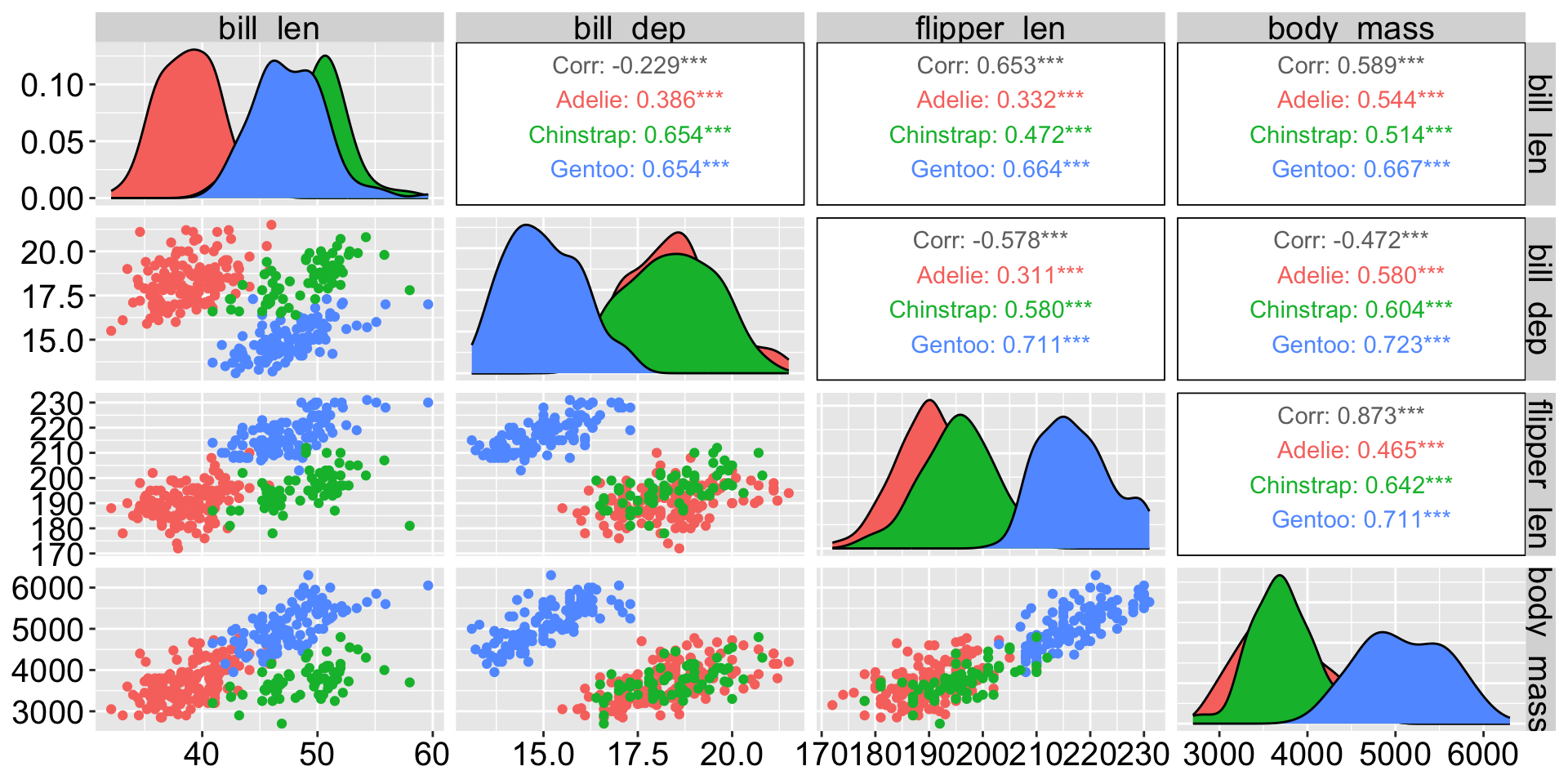
GGally::ggpairs(penguins_clean, columns = 3:6, aes(color = species))

K-means: choose the number of clusters K

set.seed(123)
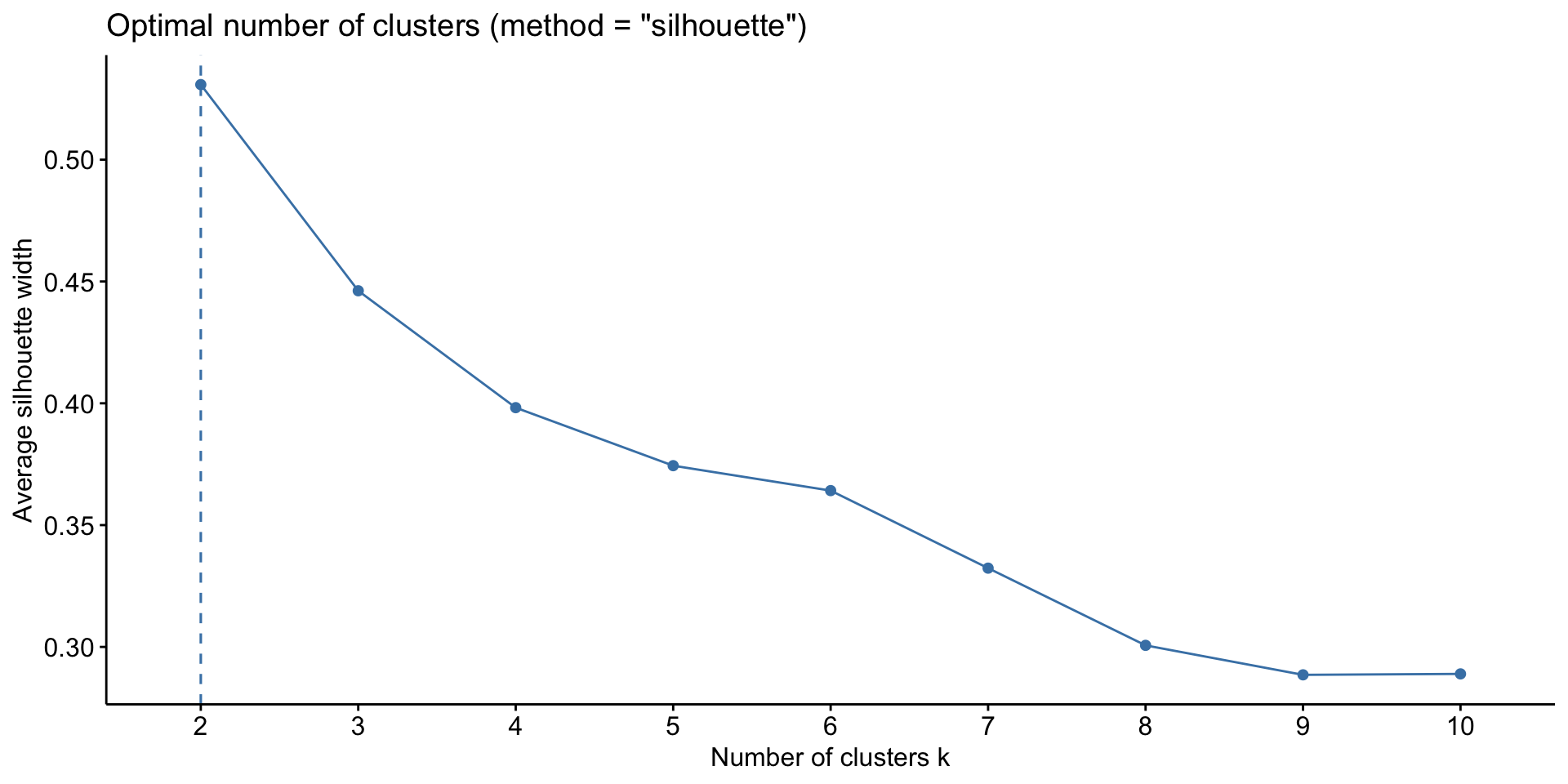
factoextra::fviz_nbclust(kmeans_df, kmeans, method = "silhouette", nstart = 20)
  • Elbow (method = "wss"): the total within-cluster variation always drops as K grows; look for where the drop levels off (around K = 2 or 3 here).
  • Silhouette: starts at K = 2, since with one cluster there is no “nearest other cluster” to compare to. It suggests K = 2, even though there are 3 species: Adelie and Chinstrap overlap a lot on these measurements.

K-means is random: nstart

K-means looks for the clusters that minimize the total within-cluster variation (the sum of squared Euclidean distances from each point to its cluster center).

  • It starts from randomly chosen centers, then repeats: assign each point to its nearest center, move each center to the mean of its points.
  • It stops when nothing changes, but this may only be a local optimum: an unlucky start can get stuck on worse clusters.

nstart runs the algorithm nstart times, each from a different random start, and keeps the run with the smallest total within-cluster variation.

K-means is random: set.seed()

set.seed() makes the result exactly reproducible. Even with nstart = 20, the same clusters can get different labels in different runs:

set.seed(2)
kmeans(kmeans_df, centers = 2, nstart = 20)$cluster |> head(10)
 [1] 1 1 1 1 1 1 1 1 1 1
set.seed(3)
kmeans(kmeans_df, centers = 2, nstart = 20)$cluster |> head(10)
 [1] 2 2 2 2 2 2 2 2 2 2
  • nstart makes K-means find the best clustering reliably.
  • set.seed() gives the same clusters and the same labels every time you run your code.

Fit K-means to the penguins data (K = 2)

set.seed(123)
kmeans_results <- kmeans_df |> kmeans(centers = 2, nstart = 20)
kmeans_results
K-means clustering with 2 clusters of sizes 119, 214

Cluster means:
    bill_len  bill_dep flipper_len  body_mass
1  0.6537742 -1.101050    1.160716  1.0995561
2 -0.3635474  0.612266   -0.645445 -0.6114354

Clustering vector:
  [1] 2 2 2 2 2 2 2 2 2 2 2 2 2 2 2 2 2 2 2 2 2 2 2 2 2 2 2 2 2 2 2 2 2 2 2 2 2
 [38] 2 2 2 2 2 2 2 2 2 2 2 2 2 2 2 2 2 2 2 2 2 2 2 2 2 2 2 2 2 2 2 2 2 2 2 2 2
 [75] 2 2 2 2 2 2 2 2 2 2 2 2 2 2 2 2 2 2 2 2 2 2 2 2 2 2 2 2 2 2 2 2 2 2 2 2 2
[112] 2 2 2 2 2 2 2 2 2 2 2 2 2 2 2 2 2 2 2 2 2 2 2 2 2 2 2 2 2 2 2 2 2 2 2 1 1
[149] 1 1 1 1 1 1 1 1 1 1 1 1 1 1 1 1 1 1 1 1 1 1 1 1 1 1 1 1 1 1 1 1 1 1 1 1 1
[186] 1 1 1 1 1 1 1 1 1 1 1 1 1 1 1 1 1 1 1 1 1 1 1 1 1 1 1 1 1 1 1 1 1 1 1 1 1
[223] 1 1 1 1 1 1 1 1 1 1 1 1 1 1 1 1 1 1 1 1 1 1 1 1 1 1 1 1 1 1 1 1 1 1 1 1 1
[260] 1 1 1 1 1 1 2 2 2 2 2 2 2 2 2 2 2 2 2 2 2 2 2 2 2 2 2 2 2 2 2 2 2 2 2 2 2
[297] 2 2 2 2 2 2 2 2 2 2 2 2 2 2 2 2 2 2 2 2 2 2 2 2 2 2 2 2 2 2 2 2 2 2 2 2 2

Within cluster sum of squares by cluster:
[1] 139.4684 411.5430
 (between_SS / total_SS =  58.5 %)

Available components:

[1] "cluster"      "centers"      "totss"        "withinss"     "tot.withinss"
[6] "betweenss"    "size"         "iter"         "ifault"      

K-means results

The kmeans_results object is a list with several components. Use $ to access each component, e.g. kmeans_results$centers gives the cluster centers.

kmeans_results$cluster
  [1] 2 2 2 2 2 2 2 2 2 2 2 2 2 2 2 2 2 2 2 2 2 2 2 2 2 2 2 2 2 2 2 2 2 2 2 2 2
 [38] 2 2 2 2 2 2 2 2 2 2 2 2 2 2 2 2 2 2 2 2 2 2 2 2 2 2 2 2 2 2 2 2 2 2 2 2 2
 [75] 2 2 2 2 2 2 2 2 2 2 2 2 2 2 2 2 2 2 2 2 2 2 2 2 2 2 2 2 2 2 2 2 2 2 2 2 2
[112] 2 2 2 2 2 2 2 2 2 2 2 2 2 2 2 2 2 2 2 2 2 2 2 2 2 2 2 2 2 2 2 2 2 2 2 1 1
[149] 1 1 1 1 1 1 1 1 1 1 1 1 1 1 1 1 1 1 1 1 1 1 1 1 1 1 1 1 1 1 1 1 1 1 1 1 1
[186] 1 1 1 1 1 1 1 1 1 1 1 1 1 1 1 1 1 1 1 1 1 1 1 1 1 1 1 1 1 1 1 1 1 1 1 1 1
[223] 1 1 1 1 1 1 1 1 1 1 1 1 1 1 1 1 1 1 1 1 1 1 1 1 1 1 1 1 1 1 1 1 1 1 1 1 1
[260] 1 1 1 1 1 1 2 2 2 2 2 2 2 2 2 2 2 2 2 2 2 2 2 2 2 2 2 2 2 2 2 2 2 2 2 2 2
[297] 2 2 2 2 2 2 2 2 2 2 2 2 2 2 2 2 2 2 2 2 2 2 2 2 2 2 2 2 2 2 2 2 2 2 2 2 2
kmean_aug <- penguins_clean |> mutate(cluster = as.factor(kmeans_results$cluster))
kmean_aug
# A tibble: 333 × 9
   species island    bill_len bill_dep flipper_len body_mass sex    year cluster
   <fct>   <fct>        <dbl>    <dbl>       <int>     <int> <fct> <int> <fct>  
 1 Adelie  Torgersen     39.1     18.7         181      3750 male   2007 2      
 2 Adelie  Torgersen     39.5     17.4         186      3800 fema…  2007 2      
 3 Adelie  Torgersen     40.3     18           195      3250 fema…  2007 2      
 4 Adelie  Torgersen     36.7     19.3         193      3450 fema…  2007 2      
 5 Adelie  Torgersen     39.3     20.6         190      3650 male   2007 2      
 6 Adelie  Torgersen     38.9     17.8         181      3625 fema…  2007 2      
 7 Adelie  Torgersen     39.2     19.6         195      4675 male   2007 2      
 8 Adelie  Torgersen     41.1     17.6         182      3200 fema…  2007 2      
 9 Adelie  Torgersen     38.6     21.2         191      3800 male   2007 2      
10 Adelie  Torgersen     34.6     21.1         198      4400 male   2007 2      
# ℹ 323 more rows

K-means results visualization

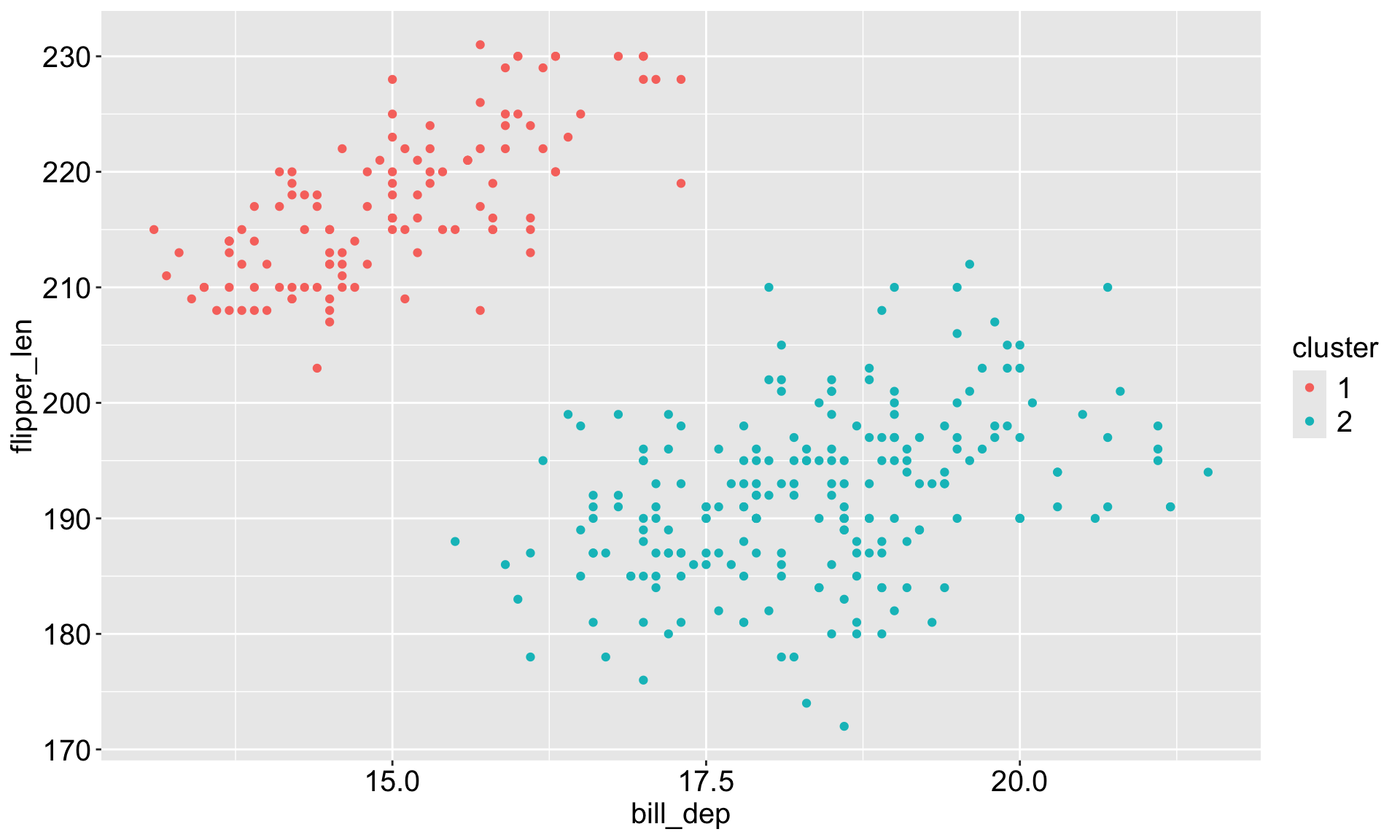
kmean_aug |> 
  ggplot(aes(x = bill_dep, y = flipper_len, 
             color = cluster)) + 
  geom_point()

kmean_aug |> 
  group_by(cluster) |> 
  summarize(
    bill_len = mean(bill_len),
    bill_dep = mean(bill_dep),
    flipper_len = mean(flipper_len),
    body_mass = mean(body_mass)
  )
# A tibble: 2 × 5
  cluster bill_len bill_dep flipper_len body_mass
  <fct>      <dbl>    <dbl>       <dbl>     <dbl>
1 1           47.6     15.0        217.     5092.
2 2           42.0     18.4        192.     3715.

Appendix: Hierarchical clustering

Hierarchical clustering in a smaller penguins data

To make the illustration simpler, we will take 10 observations for each species:

penguins_small <- penguins_clean |> 
  group_by(species) |>
  slice_head(n = 10) |>
  ungroup()
penguins_small
# A tibble: 30 × 8
   species island    bill_len bill_dep flipper_len body_mass sex     year
   <fct>   <fct>        <dbl>    <dbl>       <int>     <int> <fct>  <int>
 1 Adelie  Torgersen     39.1     18.7         181      3750 male    2007
 2 Adelie  Torgersen     39.5     17.4         186      3800 female  2007
 3 Adelie  Torgersen     40.3     18           195      3250 female  2007
 4 Adelie  Torgersen     36.7     19.3         193      3450 female  2007
 5 Adelie  Torgersen     39.3     20.6         190      3650 male    2007
 6 Adelie  Torgersen     38.9     17.8         181      3625 female  2007
 7 Adelie  Torgersen     39.2     19.6         195      4675 male    2007
 8 Adelie  Torgersen     41.1     17.6         182      3200 female  2007
 9 Adelie  Torgersen     38.6     21.2         191      3800 male    2007
10 Adelie  Torgersen     34.6     21.1         198      4400 male    2007
# ℹ 20 more rows

Hierarchical clustering in a smaller penguins data

# scale the variables
hclust_df <- penguins_small[,3:6] |> scale() 

# compute the distance
hclust_dist <- hclust_df |> dist()

# compute the hierarchical clustering
hclust_results1 <- hclust(hclust_dist, method = "single")
hclust_results1

Call:
hclust(d = hclust_dist, method = "single")

Cluster method   : single 
Distance         : euclidean 
Number of objects: 30 

Hierarchical clustering in a smaller penguins data

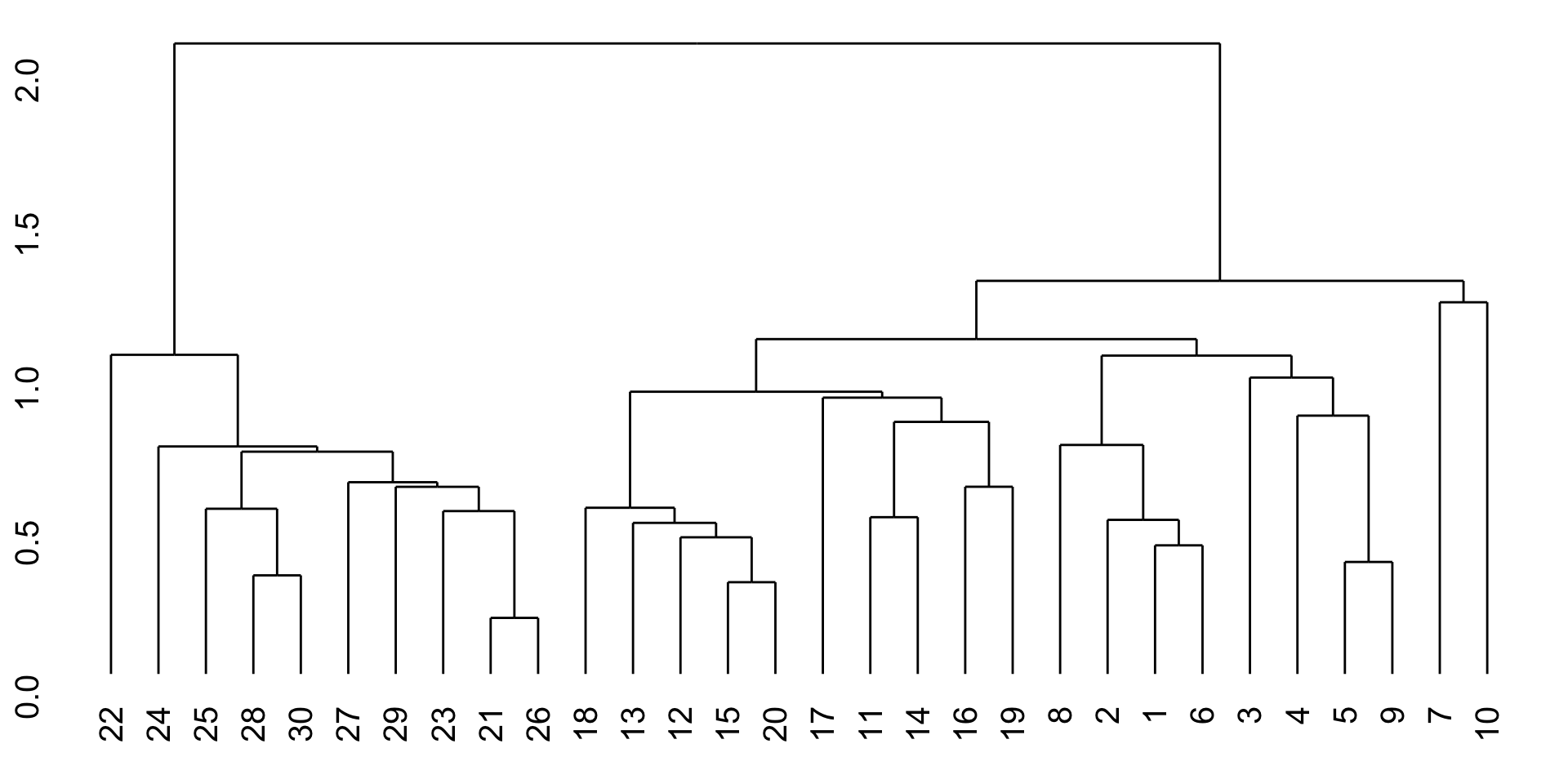
library(ggdendro)
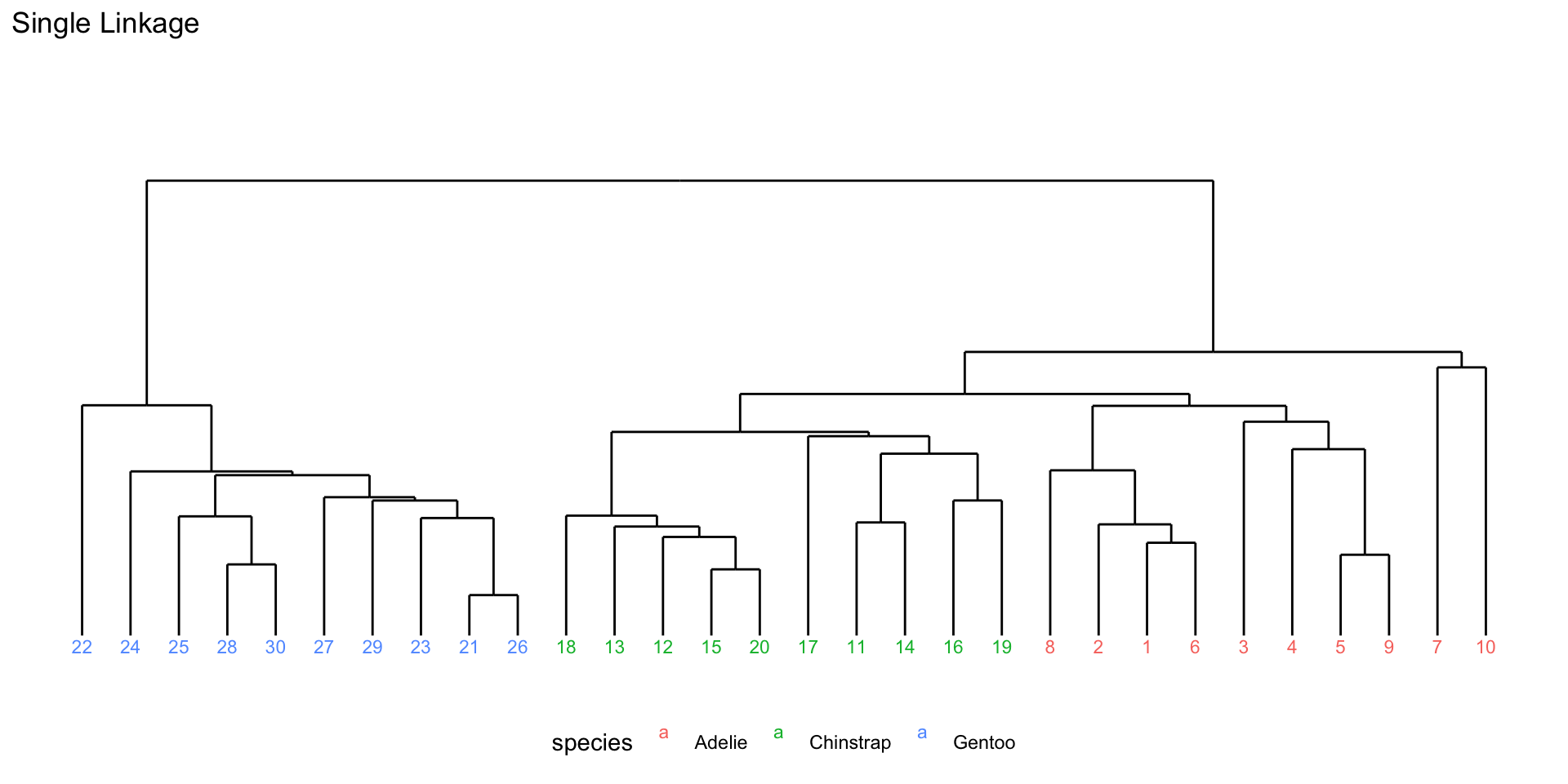
ggdendrogram(hclust_results1)

Hierarchical clustering in a smaller penguins data

Code
hclust_data1 <- ggdendro::dendro_data(hclust_results1)
hclust_segments1 <- as_tibble(hclust_data1$segments)
hclust_labels1 <- as_tibble(hclust_data1$labels) |> 
  mutate(species = penguins_small$species[as.integer(label)])

p1 <- ggplot() +
  geom_segment(data = hclust_segments1,
               aes(x = x, y = y, xend = xend, yend = yend)) +
  geom_text(data = hclust_labels1,
            aes(x = x, y = y - 0.02, label = label,
                color = species), vjust = 1, size = 3) +
  labs(title = "Single Linkage") +
  theme_minimal() +
  theme(axis.title = element_blank(),
        axis.text = element_blank(),
        axis.ticks = element_blank(),
        panel.grid = element_blank(),
        legend.position = "bottom") + 
  ylim(-0.1, 2.5)
p1

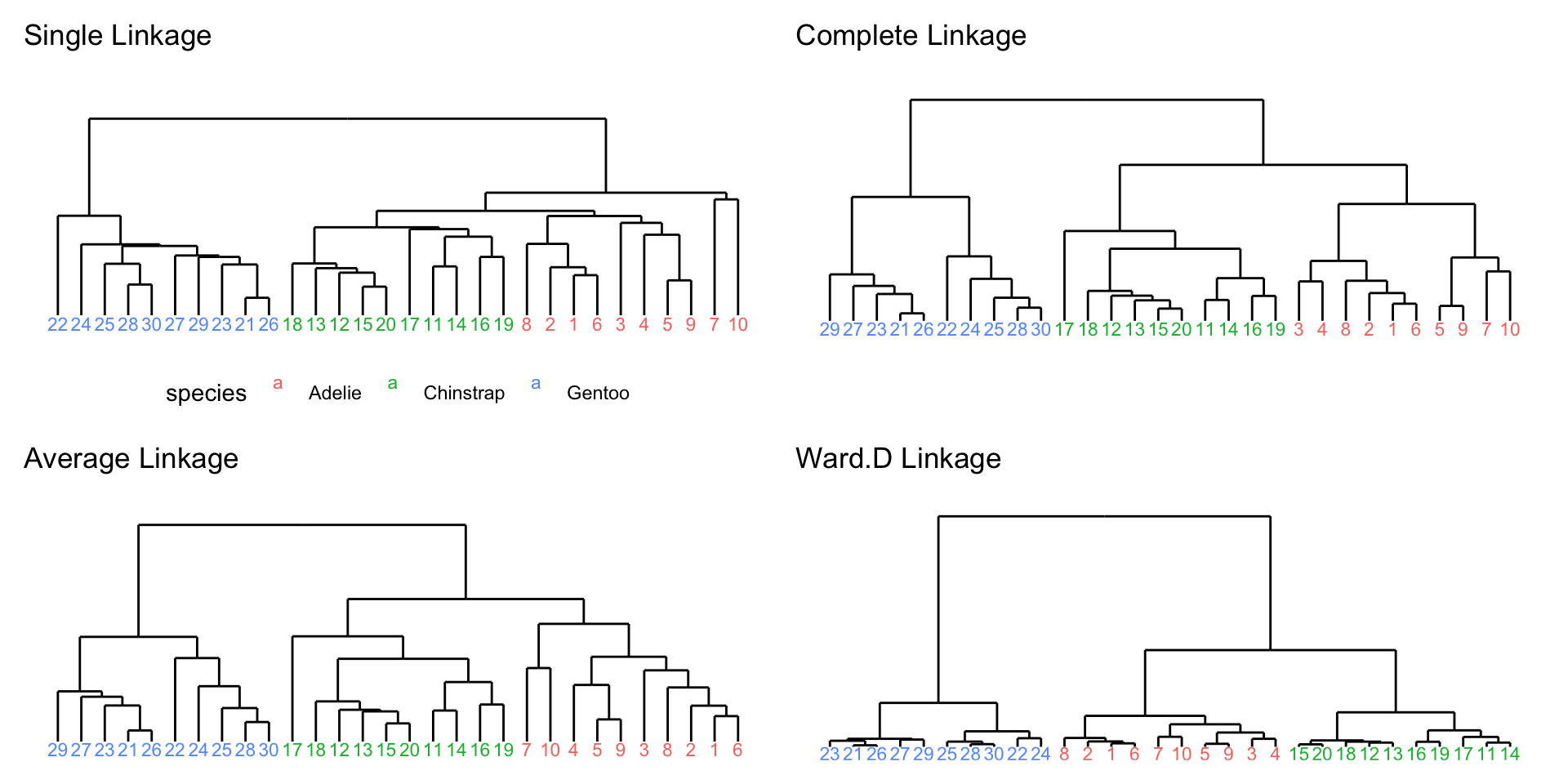
Different linkage methods

  • Single linkage: distance between two clusters is defined as the minimum distance between any single member of one cluster and any single member of the other cluster.
  • Complete linkage: distance between two clusters is defined as the maximum distance between any single member of one cluster and any single member of the other cluster.
  • Average linkage: distance between two clusters is defined as the average distance between all pairs of members from the two clusters.
  • Ward’s linkage: distance between two clusters is defined based on the increase in the total within-cluster variance that would result from merging the two clusters.

Selection:

  • Single linkage are most popular among statisticians.
  • Average and complete linkage are generally preferred over single linkage, as they tend to yield more balanced dendrograms

Hierarchical clustering in a smaller penguins data

Hierarchical clustering with the full penguins data

hclust_df <- penguins_clean[,3:6] |> scale() 

# compute the distance
hclust_dist <- hclust_df |> dist()

# compute the hierarchical clustering
hclust_results <- hclust(hclust_dist, method = "average")
hclust_results

Call:
hclust(d = hclust_dist, method = "average")

Cluster method   : average 
Distance         : euclidean 
Number of objects: 333 

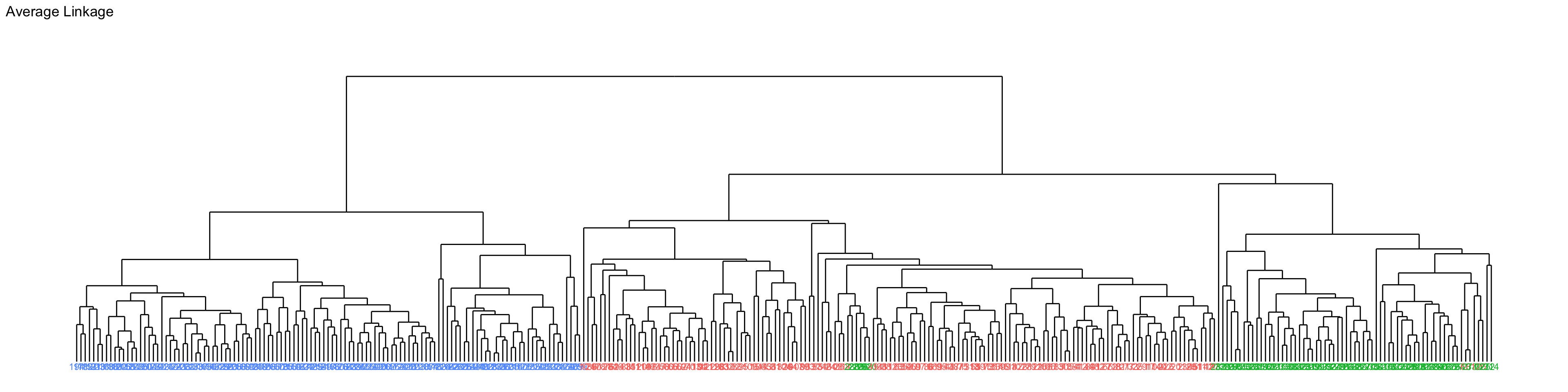
Hierarchical clustering with the full penguins data

Code
hclust_data <- ggdendro::dendro_data(hclust_results)
hclust_segments <- as_tibble(hclust_data$segments)
hclust_labels <- as_tibble(hclust_data$labels) |> 
  mutate(species = penguins_clean$species[as.integer(label)])

ggplot() +
  geom_segment(data = hclust_segments,
               aes(x = x, y = y, xend = xend, yend = yend)) +
  geom_text(data = hclust_labels,
            aes(x = x, y = y - 0.02, label = label,
                color = species), vjust = 1, size = 3) +
  labs(title = "Average Linkage") +
  theme_minimal() +
  theme(axis.title = element_blank(),
        axis.text = element_blank(),
        axis.ticks = element_blank(),
        panel.grid = element_blank(),
        legend.position = "none") +
  ylim(-0.1, 4) 

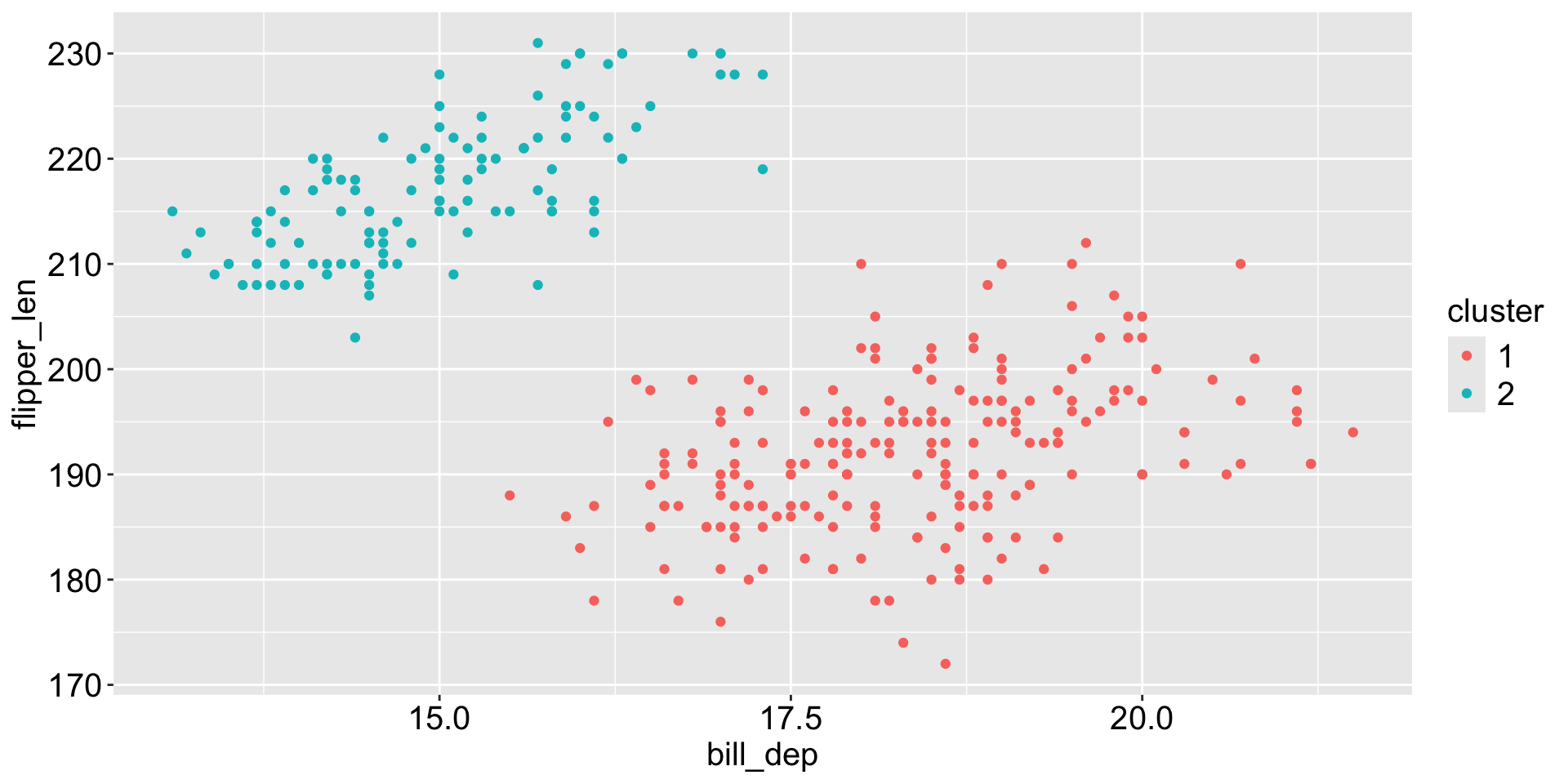
Cut the tree into two clusters

The base R function cutree() can be used to cut the dendrogram into a specified number of clusters.

# cut the dendrogram to get 2 clusters
hclust_clusters <- cutree(hclust_results, k = 2)

dt <- penguins_clean |> 
  mutate(cluster = as.factor(hclust_clusters)) 

dt |> count(cluster, species)
# A tibble: 3 × 3
  cluster species       n
  <fct>   <fct>     <int>
1 1       Adelie      146
2 1       Chinstrap    68
3 2       Gentoo      119
dt |>   
  ggplot(aes(x = bill_dep, y = flipper_len, 
             color = cluster)) + 
  geom_point()

Compare hierarchical clustering with kmeans

Hierarchical clustering: cut into 3 groups

# A tibble: 5 × 3
  cluster species       n
  <fct>   <fct>     <int>
1 1       Adelie      144
2 1       Chinstrap     5
3 2       Adelie        2
4 2       Chinstrap    63
5 3       Gentoo      119

Kmeans clustering: choose 3 centers

# A tibble: 5 × 3
  cluster species       n
  <fct>   <fct>     <int>
1 1       Adelie      124
2 1       Chinstrap     5
3 2       Adelie       22
4 2       Chinstrap    63
5 3       Gentoo      119